Python asyncio Module
asyncio is a module in the Python standard library for writing asynchronous I/O operation code.
asyncio provides an efficient way to handle concurrent tasks, especially suitable for I/O-intensive operations such as network requests, file reading/writing, etc.
By using asyncio, you can handle multiple tasks simultaneously in a single thread without using multi-threading or multi-processing.
Why Do We Need asyncio?
Section titled “Why Do We Need asyncio?”In traditional synchronous programming, when a task needs to wait for an I/O operation (such as a network request) to complete, the program blocks until the operation finishes. This leads to inefficient programs, especially when handling a large number of I/O operations.
asyncio introduces an asynchronous programming model that allows the program to continue executing other tasks while waiting for I/O operations, thereby improving the program’s concurrency and efficiency.
Imagine you’re running a restaurant:
- Synchronous Mode (normal functions): You have only one chef. Guest A orders a steak, and the chef starts cooking it (which takes 5 minutes). During those 5 minutes of cooking, the chef is fully occupied and cannot do anything else, even if Guest B just wants a glass of water — they must wait.
- Asynchronous Mode (asyncio): You have multiple chefs (actually still one, but very smart). After the chef starts cooking Guest A’s steak and realizes it needs waiting, he immediately marks the steak as “waiting” and turns to pour water for Guest B. After pouring the water, he comes back to check if the steak is almost done. If not, he can go handle Guest C’s order. This way, during the time spent waiting for I/O (like cooking steak, network requests, reading/writing files), the chef (CPU) is always working efficiently.
asyncio is the standard library Python uses to implement this smart working mode. It allows you to write single-threaded concurrent code, especially suitable for I/O-intensive scenarios such as web crawlers, web servers, and microservices.
Its core is composed of Event Loop, Coroutine, and Task.
Core Concepts of asyncio
Section titled “Core Concepts of asyncio”1. Coroutine
Section titled “1. Coroutine”A coroutine is one of the core concepts of asyncio. It is a special function that can pause execution and resume later. Coroutines are defined using the async def keyword and paused using the await keyword, waiting for an asynchronous operation to complete.
Example
Section titled “Example”2. Event Loop
Section titled “2. Event Loop”The event loop is the core component of asyncio, responsible for scheduling and executing coroutines. It continuously checks whether there are tasks to execute and calls the corresponding callback functions after tasks complete.
Example
Section titled “Example”3. Task
Section titled “3. Task”A task is a wrapper around a coroutine, representing a coroutine that is executing or about to execute. You can create tasks using the asyncio.create_task() function and add them to the event loop.
Example
Section titled “Example”4. Future
Section titled “4. Future”A Future is an object that represents the result of an asynchronous operation. It is typically used in low-level APIs to represent an operation that has not yet completed. You can wait for a Future to complete using the await keyword.
Example
Section titled “Example”Basic Usage and Code Examples
Section titled “Basic Usage and Code Examples”Let’s understand the above concepts through a classic example of concurrently accessing multiple URLs.
Suppose we need to fetch the content of three different URLs. Using the synchronous approach, they would be executed sequentially, with the total time being the sum of the three request times. Using asyncio, we can make all three requests simultaneously, with the total time close to the slowest single request.
Synchronous Version (for comparison)
Section titled “Synchronous Version (for comparison)”Example
Section titled “Example”Expected output:
It took about 6 seconds in total.
Asynchronous Version (using asyncio)
Section titled “Asynchronous Version (using asyncio)”We need to use the aiohttp library instead of requests for asynchronous HTTP requests. First, install it: pip install aiohttp.
Example
Section titled “Example”Expected output:
Code Explanation:
async def: Defines the coroutine functionsfetch_url_asyncandmain_async.await: Infetch_url_async, weawait session.get()andawait response.text(), which tells the event loop: “This network request takes time, go execute other ready tasks first.”asyncio.create_task(): Wraps thefetch_url_asynccoroutine into aTask, making it schedulable by the event loop, achieving concurrency.asyncio.gather(*tasks): A very practical function that concurrently runs all passed coroutines/tasks, waits for them all to complete, and finally collects all results.asyncio.run(main_async()): The recommended approach since Python 3.7+, it is responsible for creating the event loop, running the coroutine, and closing the loop.
Key Functions and Parameter Descriptions
Section titled “Key Functions and Parameter Descriptions”Below is a tabular description of some of the most commonly used high-level functions in asyncio:
| Function | Main Purpose | Common Parameter Descriptions |
|---|---|---|
asyncio.run(coro, *, debug=False) |
Runs a top-level coroutine and manages the lifecycle of the event loop. It is the main entry point of the program. | coro: The coroutine object to run.debug: Set to True to enable debug mode for the event loop. |
asyncio.create_task(coro, *, name=None) |
Wraps a coroutine into a Task object and schedules it in the event loop. This is the main way to achieve concurrency. | coro: The coroutine object to wrap.name: (Python 3.8+) Assigns a name to the task for easier debugging. |
asyncio.gather(*aws, return_exceptions=False) |
Concurrently runs multiple asynchronous tasks (aws accepts coroutines, tasks, etc.), waits for all to complete, and returns a list of results. |
*aws: Variable arguments, passing multiple asynchronous objects.return_exceptions: Defaults to False. If any task raises an exception, it immediately propagates to the caller of gather. Set to True to return exceptions as part of the results. |
asyncio.sleep(delay, result=None) |
Asynchronously sleeps for the specified number of seconds. This is the key difference from time.sleep (which blocks). |
delay: The number of seconds to sleep.result: The value returned after the sleep ends. |
asyncio.wait(aws, *, timeout=None, return_when=ALL_COMPLETED) |
Concurrently runs tasks and waits for a specified condition to be met. Returns two sets: (done, pending), representing completed and pending tasks. |
aws: A collection of asynchronous objects.timeout: Timeout duration (seconds).return_when: Determines when to return. Options: FIRST_COMPLETED (first completed), FIRST_EXCEPTION (first exception), ALL_COMPLETED (all completed, default). |
asyncio.to_thread(func, /, *args, **kwargs) |
(Python 3.9+) Runs a regular, potentially blocking synchronous function in a separate thread and returns an awaitable coroutine. Used for handling CPU-intensive or blocking I/O. | func: The synchronous function to run in a thread.*args, **kwargs: Arguments to pass to the function. |
Visual Understanding: Asynchronous Task Scheduling Flow
Section titled “Visual Understanding: Asynchronous Task Scheduling Flow”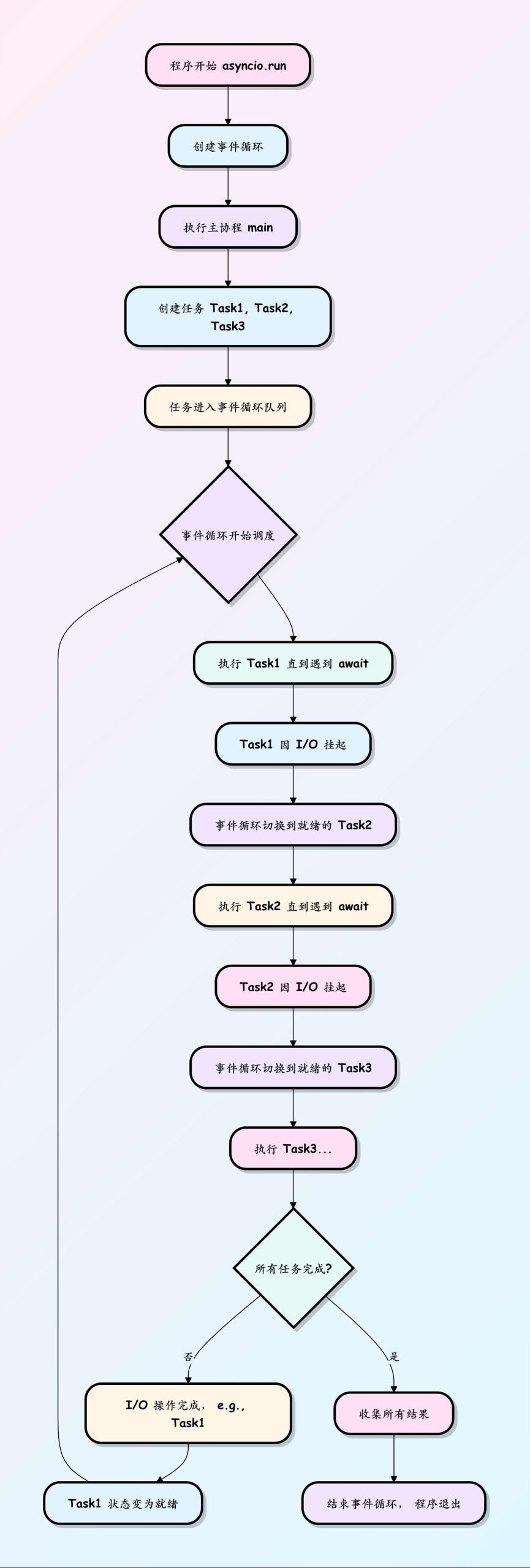
Diagram Description: This flowchart shows how the event loop works like a dispatcher. It maintains a task queue. When a task reaches an await (e.g., waiting for a network response), it is suspended, and the event loop immediately finds the next runnable (ready) task from the queue to execute. When the suspended task’s I/O operation completes, the event loop receives a notification, changes the task’s state back to ready, and continues executing it at some future point. In this way, while waiting for I/O, the CPU is fully utilized to execute other tasks, achieving concurrency within a single thread.
Basic Usage of asyncio
Section titled “Basic Usage of asyncio”1. Running a Coroutine
Section titled “1. Running a Coroutine”To run a coroutine, you can use the asyncio.run() function. It creates an event loop and runs the specified coroutine.
Example
Section titled “Example”2. Concurrently Executing Multiple Tasks
Section titled “2. Concurrently Executing Multiple Tasks”You can use the asyncio.gather() function to concurrently execute multiple coroutines and wait for them all to complete.
Example
Section titled “Example”3. Timeout Control
Section titled “3. Timeout Control”You can use the asyncio.wait_for() function to set a timeout for a coroutine. If the coroutine does not complete within the specified time, an asyncio.TimeoutError exception will be raised.
Example
Section titled “Example”Application Scenarios of asyncio
Section titled “Application Scenarios of asyncio”asyncio is particularly suitable for the following scenarios:
- Network Requests: Such as HTTP requests, WebSocket communication, etc.
- File I/O: Such as asynchronous reading and writing of files.
- Database Operations: Such as asynchronous database access.
- Real-time Data Processing: Such as real-time message queue processing.
Common Classes, Methods, and Functions
Section titled “Common Classes, Methods, and Functions”1. Core Functions
Section titled “1. Core Functions”| Method/Function | Description | Example |
|---|---|---|
asyncio.run(coro) |
Run the asynchronous main function (Python 3.7+) | asyncio.run(main()) |
asyncio.create_task(coro) |
Create a task and add it to the event loop | task = asyncio.create_task(fetch_data()) |
asyncio.gather(*coros) |
Concurrently run multiple coroutines | await asyncio.gather(task1, task2) |
asyncio.sleep(delay) |
Asynchronous sleep (non-blocking) | await asyncio.sleep(1) |
asyncio.wait(coros) |
Control how tasks complete | done, pending = await asyncio.wait([task1, task2]) |
2. Event Loop
Section titled “2. Event Loop”| Method | Description | Example |
|---|---|---|
loop.run_until_complete(future) |
Run until the task completes | loop.run_until_complete(main()) |
loop.run_forever() |
Run the event loop forever | loop.run_forever() |
loop.stop() |
Stop the event loop | loop.stop() |
loop.close() |
Close the event loop | loop.close() |
loop.call_soon(callback) |
Schedule a callback to execute immediately | loop.call_soon(print, "Hello") |
loop.call_later(delay, callback) |
Execute a callback after a delay | loop.call_later(5, callback) |
3. Coroutine and Task
Section titled “3. Coroutine and Task”| Method/Decorator | Description | Example |
|---|---|---|
@asyncio.coroutine |
Coroutine decorator (legacy, Python 3.4-3.7) | @asyncio.coroutinedef old_coro(): |
async def |
Define a coroutine (Python 3.5+) | async def fetch(): |
task.cancel() |
Cancel a task | task.cancel() |
task.done() |
Check if a task is complete | if task.done(): |
task.result() |
Get the task result (task must be complete) | data = task.result() |
4. Synchronization Primitives (similar to threading)
Section titled “4. Synchronization Primitives (similar to threading)”| Class | Description | Example |
|---|---|---|
asyncio.Lock() |
Asynchronous mutex lock | lock = asyncio.Lock()async with lock: |
asyncio.Event() |
Event notification | event = asyncio.Event()await event.wait() |
asyncio.Queue() |
Asynchronous queue | queue = asyncio.Queue()await queue.put(item) |
asyncio.Semaphore() |
Semaphore | sem = asyncio.Semaphore(5)async with sem: |
5. Networking and Subprocesses
Section titled “5. Networking and Subprocesses”| Method/Class | Description | Example |
|---|---|---|
asyncio.open_connection() |
Establish a TCP connection | reader, writer = await asyncio.open_connection('host', 80) |
asyncio.start_server() |
Create a TCP server | server = await asyncio.start_server(handle, '0.0.0.0', 8888) |
asyncio.create_subprocess_exec() |
Create a subprocess | proc = await asyncio.create_subprocess_exec('ls') |
6. Utility Tools
Section titled “6. Utility Tools”| Method | Description | Example |
|---|---|---|
asyncio.current_task() |
Get the current task | task = asyncio.current_task() |
asyncio.all_tasks() |
Get all tasks | tasks = asyncio.all_tasks() |
asyncio.shield(coro) |
Protect a task from cancellation | await asyncio.shield(critical_task) |
asyncio.wait_for(coro, timeout) |
Wait with a timeout | try: await asyncio.wait_for(task, 5) |
Examples
Section titled “Examples”1. Basic Coroutine Example
Example
Section titled “Example”2. Concurrent Task Execution
Example
Section titled “Example”3. Using Asynchronous Queues
Example
Section titled “Example”Important Notes
Section titled “Important Notes”-
Python Version: Some features require Python 3.7+ (e.g.,
asyncio.run()). -
Blocking Operations: Avoid using synchronous blocking code (e.g.,
time.sleep()) in coroutines. -
Debugging: Set the
PYTHONASYNCIODEBUG=1environment variable to enable debug mode. -
Canceling Tasks: Canceled tasks will raise
CancelledError, which must be handled properly.