openai is a powerful Python library for interacting with OpenAI’s range of models and services.
openai wraps all RESTful API calls, allowing developers to easily integrate powerful AI capabilities such as natural language processing, image generation, and speech recognition into their Python applications.
Key Features:
- Text Generation: Use GPT-4 or GPT-5 models to generate articles, code, summaries, conversations, and more.
- Image Generation: Create images from text descriptions using the DALL-E model.
- Embeddings: Convert text into vector representations, commonly used for semantic search, text classification, and clustering tasks.
- Speech to Text: Use the Whisper model to transcribe audio files into text.
- Fine-tuning: Train a more targeted model by providing your own dataset.
- Assistants API: Build complex applications that can understand context, invoke tools, and engage in long-term interactions.
openai open source repository: https://github.com/openai/openai-python
Environment requirements:
- Python version: 3.9 and above.
- Dependencies: httpx (default), aiohttp (optional), websockets (required for Realtime API).
First, you need to install the openai library using pip:
pip install openai

or

pip3 install openai
Then you need to go to the OpenAI website at https://platform.openai.com/ to register an account, and generate an API Key on the API keys page.
Check the installed version:
import openai
print(openai.__version__)  # Output the current SDK version
import os
from openai import OpenAI

client = OpenAI(
    # This is the default and can be omitted
    api_key="Your API key",
)

response = client.responses.create(
    model="gpt-4o",
    instructions="You are a coding assistant that talks like a pirate.",
    input="How do I check if a Python object is an instance of a class?",
)

print(response.output_text)
Parameter Descriptions:
| Parameter Name |
Required |
Type |
Description |
api_key |
Yes |
str |
Your OpenAI API key |
model |
Yes |
str |
Specifies the OpenAI model to use, determining capability, reasoning level, and cost |
instructions |
No |
str |
System-level instructions (System Prompt), defining the model’s identity, behavior norms, and expression style. Priority is higher than input |
input |
Yes |
str / list |
User input content, describing the specific problem or task |
Accessing OpenAI can still be somewhat challenging domestically. Many domestic platforms also support OpenAI-compatible APIs, such as DeepSeek, Qwen, and GLM.
Visit iFlytek Xingchen MaaS iFlytek Large Model Platform, which currently offers free large model products.
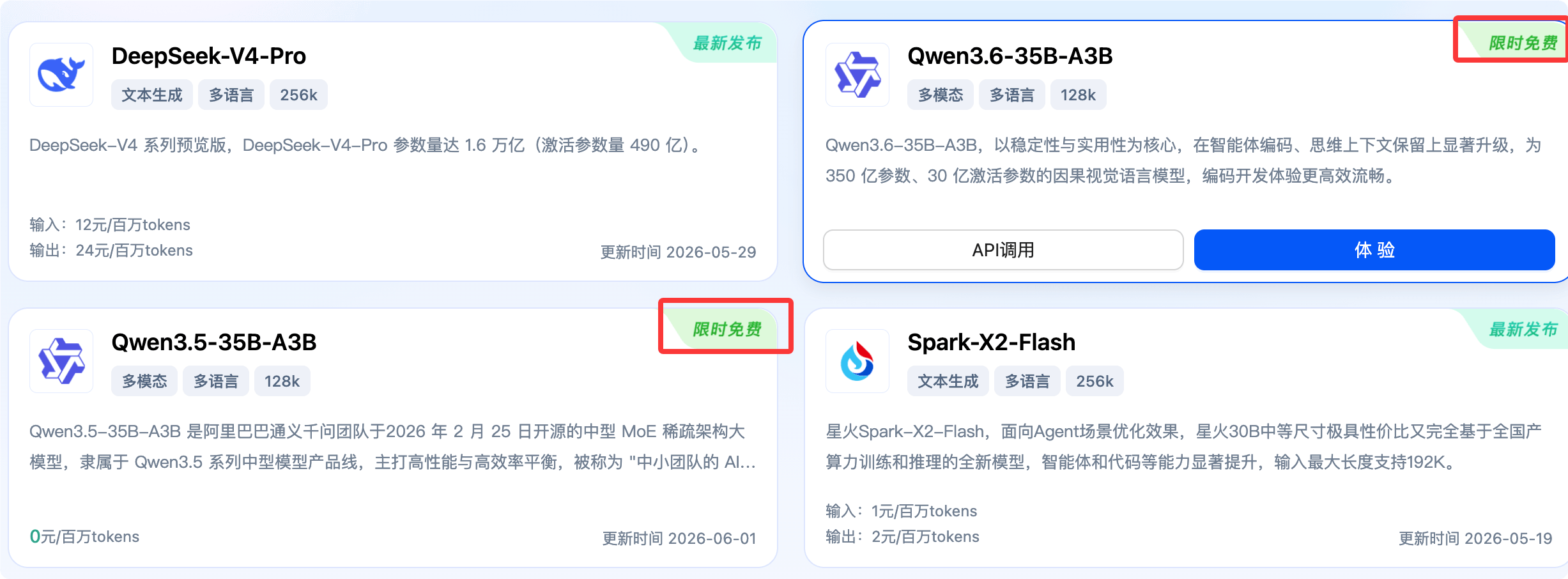
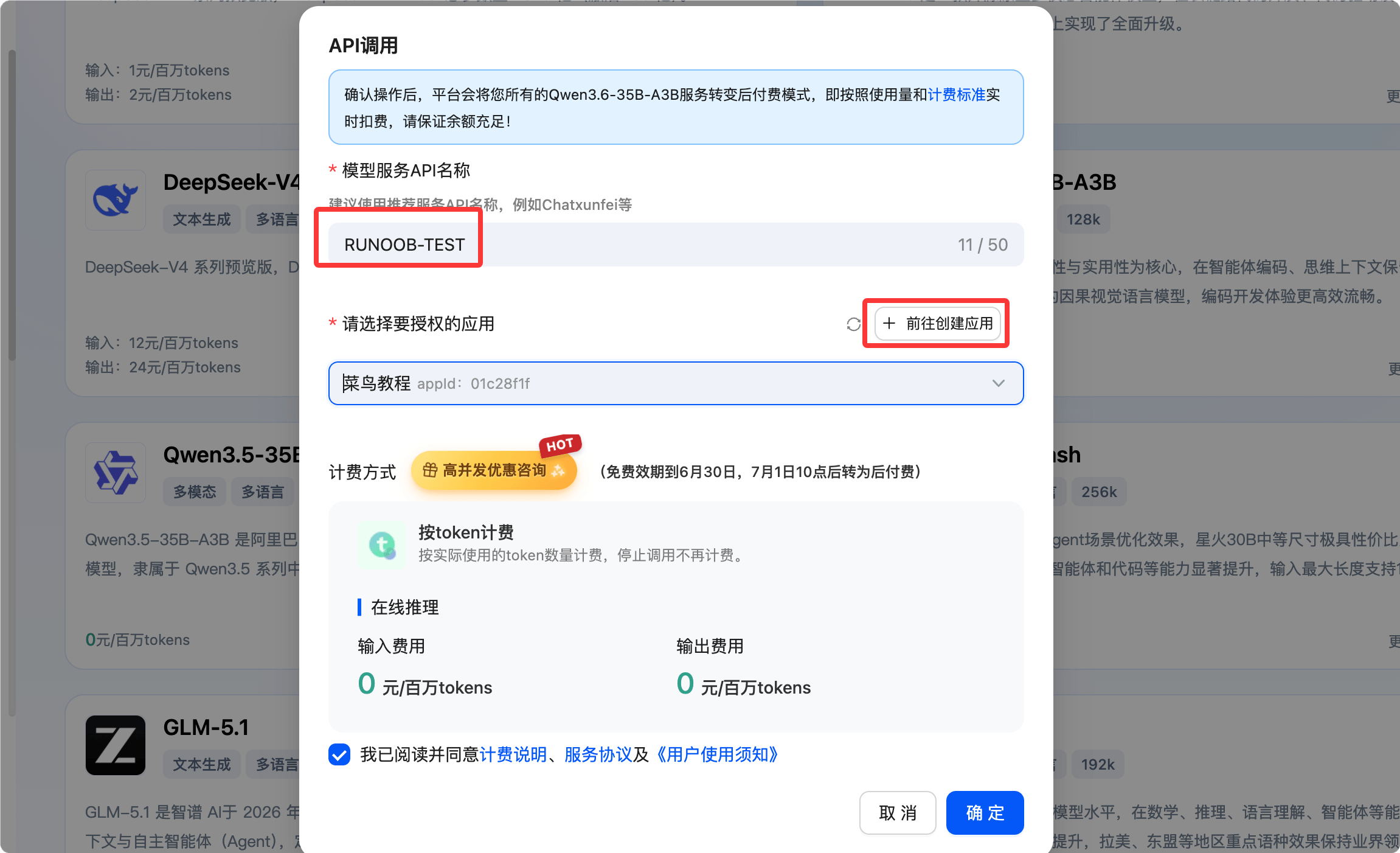
Hover over the free model, then select API Call, set the name and authorized application:
Looking at the protocol support, it currently only has the OpenAI-compatible protocol:
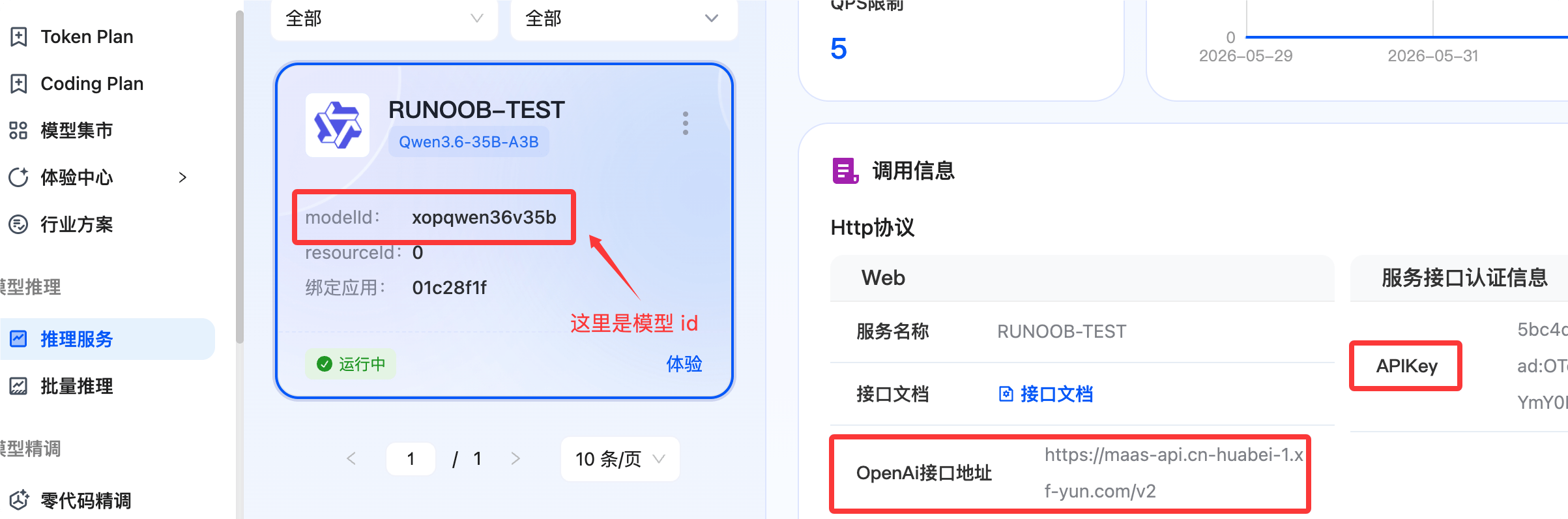
Let’s write a Python file to test it:
from openai import OpenAI

# Required: Obtain the corresponding service APIKey and API Base from the service management page
api_key = "The APIKey you applied for in the image above"
api_base = "http://maas-api.cn-huabei-1.xf-yun.com/v2"

client = OpenAI(api_key=api_key, base_url=api_base)

response = client.chat.completions.create(
    model="modelId from the image above",  # Model name, required
    messages=[
        {"role": "system", "content": "You are a helpful assistant"},
        {"role": "user", "content": "Hello"},
    ],
    stream=False    # stream=False non-streaming (one-time return), stream=True streaming (real-time return)
)

print(response.choices[0].message.content)
Fill in the corresponding api_key, api_base, and model parameters, then execute:
Hello! How can I help you today?
A more complete call:
from openai import OpenAI

# Required: Obtain the corresponding service APIKey and API Base from the service management page
api_key = "<YOUR_API_KEY>"
api_base = "http://maas-api.cn-huabei-1.xf-yun.com/v2"

client = OpenAI(api_key=api_key, base_url=api_base)

def unified_chat_test(model_id, messages, use_stream=False, extra_body={}):
    """
    A unified function demonstrating various calling scenarios.

    :param model_id: The model ID to call.
    :param messages: The list of conversation messages.
    :param use_stream: Whether to use streaming output.
    :param extra_body: A dictionary containing additional request parameters, such as response_format.
    """
    try:
        response = client.chat.completions.create(
            model=model_id,
            messages=messages,
            stream=use_stream,
            temperature=0.7,
            max_tokens=4096,
            extra_headers={"lora_id": "0"},  # When calling a fine-tuned model, replace with the resourceId from the model service card
            stream_options={"include_usage": True},
            extra_body=extra_body
        )

        if use_stream:
            # Handle streaming response
            full_response = ""
            print("--- Streaming Output ---")
            for chunk in response:
                if hasattr(chunk.choices[0].delta, 'content') and chunk.choices[0].delta.content:
                    content = chunk.choices[0].delta.content
                    print(content, end="", flush=True)
                    full_response += content
            print("\n\n--- Full Response ---")
            print(full_response)
        else:
            # Handle non-streaming response
            print("--- Non-Streaming Output ---")
            message = response.choices[0].message
            print(message.content)

    except Exception as e:
        print(f"Request error: {e}")

if __name__ == "__main__":
    model_id = "<YOUR_MODEL_ID>" # Required: When calling a large model, corresponds to the modelId on the inference service model card

    # 1. Normal non-streaming call
    print("********* 1. Normal Non-Streaming Call *********")
    plain_messages = [{"role": "user", "content": "Hello, please introduce yourself."}]
    unified_chat_test(model_id, plain_messages, use_stream=False)

    # 2. Normal streaming call
    print("\n********* 2. Normal Streaming Call *********")
    stream_messages = [{"role": "user", "content": "Write a poem about summer."}]
    unified_chat_test(model_id, stream_messages, use_stream=True)

    # 3. JSON Mode call
    print("\n********* 3. JSON Mode Call *********")
    json_messages = [{"role": "user", "content": "Please give me a JSON object about Shanghai, containing city name (city) and population (population)."}]
    json_extra_body = {
        "response_format": {"type": "json_object"},
        "search_disable": True # It is recommended to disable search in JSON Mode
    }
    unified_chat_test(model_id, json_messages, use_stream=False, extra_body=json_extra_body)

    # 4. Test stop and prefix continuation functionality
    print("\n********* 4. Test stop and prefix continuation functionality *********")
    print("Set stop words: ['。', '!'] - The model will stop generating when encountering a period or exclamation mark")
    stream_messages = [{"role": "user", "content": "Explain what 1 plus 1 equals."}]
    unified_chat_test(model_id, stream_messages, use_stream=True, extra_body={"stop": ["。","!"],"continue_final_message":True})

    # 5. Tools/Function Calling example
    print("\n********* 5. Tools/Function Calling Example *********")
    tools = [
        {
            "type": "function",
            "function": {
                "name": "get_weather",
                "description": "Get the weather information for a specified city",
                "parameters": {
                    "type": "object",
                    "properties": {
                        "location": {
                            "type": "string",
                            "description": "City name, e.g.: Beijing, Shanghai"
                        },
                        "unit": {
                            "type": "string",
                            "enum": ["celsius", "fahrenheit"],
                            "description": "Temperature unit"
                        }
                    },
                    "required": ["location"]
                }
            }
        }
    ]
    tool_messages = [{"role": "user", "content": "What's the weather like in Beijing today?"}]
    response = client.chat.completions.create(
        model=model_id,
        messages=tool_messages,
        tools=tools,
        tool_choice="auto"
    )
    message = response.choices[0].message
    if message.tool_calls:
        print(f"Model requested tool call: {message.tool_calls[0].function.name}")
        print(f"Parameters: {message.tool_calls[0].function.arguments}")
    else:
        print(message.content)
Note that in the above code you need to set your api_key and model_id:
api_key = "xxx" # This configuration needs to be modified
api_base = "http://maas-api.cn-huabei-1.xf-yun.com/v2"
model_id = " xxxx" # This configuration needs to be modified
The output is as follows:
********* 1. Normal Non-Streaming Call *********
--- Non-Streaming Output ---
Hello! I am Tongyi Qianwen (Qwen), a large language model independently developed by Alibaba Group's Tongyi Lab.

Nice to meet you! I can serve as your intelligent companion, providing support and assistance in various areas, such as:

*   **Content Creation and Editing**: Helping you write articles, emails, reports, stories, or perform text polishing and translation.
*   **Logical Reasoning and Problem Solving
...
The DeepSeek API is fully compatible with the OpenAI API format. You only need to modify a few configurations to directly use the OpenAI SDK or compatible tools to access the DeepSeek API.
| base_url |
Required, fixed value: https://api.deepseek.com (can also use https://api.deepseek.com/v1, only for OpenAI compatibility, v1 is unrelated to model version) |
| api_key |
Required, you need to apply for a dedicated API Key on the DeepSeek official website first (application address: https://platform.deepseek.com/) |
| model |
Required, the model to use:
deepseek-v4-flash: Corresponds to DeepSeek's non-thinking mode, with fast response speed, suitable for general Q&A.deepseek-v4-pro: Corresponds to DeepSeek's thinking mode, with stronger reasoning ability, suitable for complex problem solving. |
import os
from openai import OpenAI

client = OpenAI(
    api_key=os.environ.get('DEEPSEEK_API_KEY'),   # Recommended to configure via environment variable, can also hardcode (not recommended)
    base_url="https://api.deepseek.com")

response = client.chat.completions.create(
    model="deepseek-v4-flash",
    messages=[
        {"role": "system", "content": "You are a helpful assistant"},
        {"role": "user", "content": "Hello"},
    ],
    stream=False    # stream=False non-streaming (one-time return), stream=True streaming (real-time return)
)

print(response.choices[0].message.content)
Next, we use the OpenAI SDK to access the Tongyi Qianwen model on the Bailian service.
from openai import OpenAI
import os

def get_response():
    client = OpenAI(
        api_key="sk-xxx",  # Please use your Alibaba Cloud Bailian API Key
        base_url="https://dashscope.aliyuncs.com/compatible-mode/v1",  # Fill in the DashScope SDK base_url
    )
    completion = client.chat.completions.create(
        model="qwen-plus",  # Using qwen-plus as an example here, you can change the model name as needed. Model list: https://help.aliyun.com/zh/model-studio/getting-started/models
        messages=[{'role': 'system', 'content': 'You are a helpful assistant.'},
                  {'role': 'user', 'content': 'Who are you?'}]
        )
    # JSON data
    #print(completion.model_dump_json())
    print(completion.choices[0].message.content)

if __name__ == '__main__':
    get_response()
Running the code produces the following result:
I am Tongyi Qianwen, a super-large-scale language model independently developed by Alibaba Group's Tongyi Lab. I can help you answer questions, create text such as writing stories, official documents, emails, scripts, logical reasoning, programming, and more. I can also express opinions, play games, etc. If you have any questions or need help, feel free to let me know anytime!
from openai import OpenAI

def get_response():
    client = OpenAI(
        api_key="sk-xxx",
        base_url="https://dashscope.aliyuncs.com/compatible-mode/v1",
    )

    completion = client.chat.completions.create(
        model="qwen-plus",
        messages=[
            {'role': 'system', 'content': 'You are a helpful assistant.'},
            {'role': 'user', 'content': 'Who are you?'}
        ],
        stream=True,
        stream_options={"include_usage": True}
    )

    for chunk in completion:
        # chunk may not have choices or delta
        if hasattr(chunk, "choices") and len(chunk.choices) > 0:
            choice = chunk.choices[0]
            if hasattr(choice, "delta") and hasattr(choice.delta, "content"):
                print(choice.delta.content, end='', flush=True)

if __name__ == '__main__':
    get_response()
Running the code produces the following result:
I am Tongyi Qianwen, a super-large-scale language model independently developed by Alibaba Group's Tongyi Lab. I can help you answer questions, create text such as writing stories, official documents, emails, scripts, logical reasoning, programming, and more. I can also express opinions, play games, etc. If you have any questions or need help, feel free to let me know anytime!
Supports image input (URL or Base64 encoding), enabling multimodal interaction.
Image URL input:
prompt = "What is in this image?"
img_url = "https://upload.wikimedia.org/wikipedia/commons/thumb/d/d5/2023_06_08_Raccoon1.jpg/1599px-2023_06_08_Raccoon1.jpg"

response = client.responses.create(
    model="gpt-5.2",
    input=[
        {
            "role": "user",
            "content": [
                {"type": "input_text", "text": prompt},
                {"type": "input_image", "image_url": img_url},
            ],
        }
    ],
)
print(response.output_text)
Base64 encoded image input:
import base64
from openai import OpenAI

client = OpenAI()

prompt = "What is in this image?"
# Read a local image and encode it as Base64
with open("path/to/image.png", "rb") as image_file:
    b64_image = base64.b64encode(image_file.read()).decode("utf-8")

response = client.responses.create(
    model="gpt-5.2",
    input=[
        {
            "role": "user",
            "content": [
                {"type": "input_text", "text": prompt},
                {"type": "input_image", "image_url": f"data:image/png;base64,{b64_image}"},
            ],
        }
    ],
)
Replace OpenAI with AsyncOpenAI and call the API using await:
Basic async example:
import os
import asyncio
from openai import AsyncOpenAI

client = AsyncOpenAI(
    api_key=os.environ.get("OPENAI_API_KEY"),
)

async def main() -> None:
    response = await client.responses.create(
        model="gpt-5.2",
        input="Explain disestablishmentarianism to a smart five year old."
    )
    print(response.output_text)

asyncio.run(main())
Async scenario optimization (aiohttp backend), install the extended version:
pip install openai[aiohttp]
aiohttp backend optimization:
import os
import asyncio
from openai import DefaultAioHttpClient, AsyncOpenAI

async def main() -> None:
    # Context manager ensures resource release
    async with AsyncOpenAI(
        api_key=os.environ.get("OPENAI_API_KEY"),
        http_client=DefaultAioHttpClient(),  # Enable aiohttp backend
    ) as client:
        chat_completion = await client.chat.completions.create(
            messages=[{"role": "user", "content": "Say this is a test"}],
            model="gpt-5.2",
        )

asyncio.run(main())
Based on Server Side Events (SSE) for real-time response retrieval, with consistent sync/async interfaces.
Sync streaming example:
from openai import OpenAI

client = OpenAI()

stream = client.responses.create(
    model="gpt-5.2",
    input="Write a one-sentence bedtime story about a unicorn.",
    stream=True,  # Enable streaming output
)

for event in stream:
    print(event)  # Print response piece by piece
Async streaming example:
import asyncio
from openai import AsyncOpenAI

client = AsyncOpenAI()

async def main():
    stream = await client.responses.create(
        model="gpt-5.2",
        input="Write a one-sentence bedtime story about a unicorn.",
        stream=True,
    )
    async for event in stream:
        print(event)

asyncio.run(main())
Low-latency multimodal conversation (text / audio), implemented via WebSocket, dependent on the websockets library.
Basic text example:
import asyncio
from openai import AsyncOpenAI

async def main():
    client = AsyncOpenAI()
    # Establish a realtime connection
    async with client.realtime.connect(model="gpt-realtime") as connection:
        # Update session configuration (text output only)
        await connection.session.update(
            session={"type": "realtime", "output_modalities": ["text"]}
        )
        # Send user message
        await connection.conversation.item.create(
            item={
                "type": "message",
                "role": "user",
                "content": [{"type": "input_text", "text": "Say hello!"}],
            }
        )
        # Trigger model response
        await connection.response.create()
        # Listen for realtime events
        async for event in connection:
            if event.type == "response.output_text.delta":
                print(event.delta, flush=True, end="")  # Print text fragments in real time
            elif event.type == "response.output_text.done":
                print()  # Newline after response ends
            elif event.type == "response.done":
                break  # Stop listening

asyncio.run(main())
Realtime API error handling:
import asyncio
from openai import AsyncOpenAI

client = AsyncOpenAI()

async def main():
    async with client.realtime.connect(model="gpt-realtime") as connection:
        async for event in connection:
            if event.type == 'error':
                # Catch and handle error events (the connection will not disconnect)
                print(f"Error type: {event.error.type}")
                print(f"Error code: {event.error.code}")
                print(f"Error message: {event.error.message}")

asyncio.run(main())
The following tables contain:
- Core Initialization: Use
OpenAI for sync, AsyncOpenAI for async, AzureOpenAI for Azure. It is recommended to configure the API Key via environment variables.
- Text Generation: Prefer
responses.create() for new versions, use chat.completions.create() for classic scenarios, set stream=True for streaming output.
- Advanced Capabilities: Supports multimodal (image input), Realtime API, file upload/fine-tuning. Error handling should catch
APIError subclasses, with flexible timeout/retry configuration.
Install the official SDK:
pip install --upgrade openai
Import core classes:
from openai import OpenAI, AsyncOpenAI, AzureOpenAI
Create a standard OpenAI client:
from openai import OpenAI

client = OpenAI(api_key="YOUR_API_KEY")
Create a client via environment variables:
import os
from openai import OpenAI

os.environ["OPENAI_API_KEY"] = "YOUR_API_KEY"
client = OpenAI()
Set request timeout and retry count:
client = OpenAI(
    timeout=30,
    max_retries=2
)
The most basic text generation request:
response = client.responses.create(
    model="gpt-5.2",
    input="Explain what Python is in one sentence"
)

print(response.output_text)
Constrain model behavior via instructions:
response = client.responses.create(
    model="gpt-5.2",
    instructions="You are a rigorous Python tutorial author",
    input="Explain what list comprehensions are"
)

print(response.output_text)
Use the input array to build contextual conversations:
response = client.responses.create(
    model="gpt-5.2",
    input=[
        {"role": "user", "content": "What is Python?"},
        {"role": "assistant", "content": "Python is a high-level programming language."},
        {"role": "user", "content": "What is it suitable for?"}
    ]
)

print(response.output_text)
Request the model to return JSON data conforming to a Schema:
response = client.responses.create(
    model="gpt-5.2",
    response_format={
        "type": "json_schema",
        "json_schema": {
            "name": "tech_summary",
            "schema": {
                "type": "object",
                "properties": {
                    "title": {"type": "string"},
                    "summary": {"type": "string"}
                },
                "required": ["title", "summary"]
            }
        }
    },
    input="Introduce asyncio"
)

print(response.output_parsed)
Define tools and let the model automatically decide whether to call them:
tools = [
    {
        "type": "function",
        "function": {
            "name": "get_weather",
            "description": "Get the weather for a city",
            "parameters": {
                "type": "object",
                "properties": {
                    "city": {"type": "string"}
                },
                "required": ["city"]
            }
        }
    }
]

response = client.responses.create(
    model="gpt-5.2",
    tools=tools,
    input="What's the weather like in Beijing today?"
)

print(response.output)
Sync streaming output:
with client.responses.stream(
    model="gpt-5.2",
    input="Write a Python example code snippet"
) as stream:
    for event in stream:
        if event.type == "response.output_text.delta":
            print(event.delta, end="")
Async streaming output:
stream = await client.responses.create(
    model="gpt-5.2",
    input="Explain what generative AI is",
    stream=True
)

async for event in stream:
    print(event)
Use the async client in asyncio:
import asyncio
from openai import AsyncOpenAI

client = AsyncOpenAI()

async def main():
    response = await client.responses.create(
        model="gpt-5.2",
        input="Explain what an event loop is"
    )
    print(response.output_text)

asyncio.run(main())
Use WebSocket for low-latency real-time conversations:
async with client.realtime.connect(model="gpt-realtime") as conn:
    await conn.session.update(
        session={"type": "realtime", "output_modalities": ["text"]}
    )

    await conn.conversation.item.create(
        item={
            "type": "message",
            "role": "user",
            "content": [{"type": "input_text", "text": "Hello"}]
        }
    )

    async for event in conn:
        print(event)
Generate images from text:
image = client.images.generate(
    model="gpt-image-1",
    prompt="A cat writing code",
    size="1024x1024"
)

print(image.data[0].url)
Generate text vector embeddings:
embedding = client.embeddings.create(
    model="text-embedding-3-small",
    input="Hello world"
)

print(embedding.data[0].embedding)
Convert audio files to text:
audio_file = open("speech.mp3", "rb")

transcript = client.audio.transcriptions.create(
    model="whisper-1",
    file=audio_file
)

print(transcript.text)
Convert text to speech files:
speech = client.audio.speech.create(
    model="gpt-4o-mini-tts",
    voice="alloy",
    input="Hello, welcome to use OpenAI"
)

with open("output.mp3", "wb") as f:
    f.write(speech)
Upload a file:
from pathlib import Path

client.files.create(
    file=Path("data.jsonl"),
    purpose="fine-tune"
)
List files:
files = client.files.list()
for f in files:
    print(f.id, f.filename)
Delete a file:
client.files.delete(file_id="file-xxx")
Create a fine-tuning job:
job = client.fine_tuning.jobs.create(
    training_file="file-xxx",
    model="gpt-3.5-turbo"
)

print(job.id, job.status)
Verify and parse Webhook requests:
event = client.webhooks.unwrap(request_body, request_headers)
Verify signature only:
client.webhooks.verify_signature(request_body, request_headers)
Catch exceptions thrown by the SDK:
import openai

try:
    client.responses.create(
        model="gpt-5.2",
        input="test"
    )
except openai.RateLimitError as e:
    print("Rate limit triggered:", e)
except openai.APIConnectionError as e:
    print("Connection failed:", e)
Get the Request ID of a failed request:
try:
    client.responses.create(model="gpt-5.2", input="test")
except openai.APIStatusError as exc:
    print(exc.request_id)
Initialize the Azure OpenAI client:
from openai import AzureOpenAI

client = AzureOpenAI(
    api_version="2023-07-01-preview",
    azure_endpoint="https://xxx.openai.azure.com"
)
Check the SDK version:
import openai
print(openai.__version__)
Enable SDK debug logging:
More API reference: https://github.com/openai/openai-python/blob/main/api.md