Python3 Object-Oriented Programming
Python has been an object-oriented language from its inception. Because of this, creating classes and objects in Python is very easy. This chapter will introduce Python’s object-oriented programming in detail.
If you have never been exposed to object-oriented programming languages before, you may need to first understand some basic characteristics of object-oriented languages to form a fundamental concept of OOP in your mind, which will help you learn Python’s object-oriented programming more easily.
Let’s first briefly understand some basic features of object-oriented programming.
Introduction to Object-Oriented Technology
Section titled “Introduction to Object-Oriented Technology”- Class: Used to describe a collection of objects with the same properties and methods. It defines the properties and methods common to each object in the collection. Objects are instances of classes.
- Method: A function defined within a class.
- Class Variable: Class variables are common to all instantiated objects. Class variables are defined within the class but outside the function body. Class variables are typically not used as instance variables.
- Data Member: Class variables or instance variables used to handle data related to the class and its instance objects.
- Method Overriding: If a method inherited from a parent class cannot meet the needs of the subclass, it can be rewritten. This process is called method overriding.
- Local Variable: A variable defined within a method that only affects the class of the current instance.
- Instance Variable: In the declaration of a class, attributes are represented by variables. Such variables are called instance variables. An instance variable is a variable modified with self.
- Inheritance: A derived class inherits the fields and methods of a base class. Inheritance also allows treating an object of a derived class as an object of the base class. For example, with a design where a Dog type object is derived from the Animal class, this simulates an “is-a” relationship (e.g., a Dog is an Animal).
- Instantiation: Creating an instance of a class, a concrete object of the class.
- Object: An instance of a data structure defined by a class. An object includes two data members (class variables and instance variables) and methods.
Compared to other programming languages, Python adds a class mechanism while minimizing the addition of new syntax and semantics.
Classes in Python provide all the basic features of object-oriented programming: the class inheritance mechanism allows multiple base classes, derived classes can override any method of the base class, and methods can call methods of the same name in the base class.
Objects can contain any number and type of data.
Class Definition
Section titled “Class Definition”The syntax format is as follows:
After a class is instantiated, its properties can be used. In fact, after creating a class, you can access its properties through the class name.
Class Objects
Section titled “Class Objects”Class objects support two operations: attribute reference and instantiation.
Attribute reference uses the same standard syntax as all attribute references in Python: obj.name.
After a class object is created, all names in the class namespace are valid attribute names. So if the class definition is as follows:
Example (Python 3.0+)
Section titled “Example (Python 3.0+)”The above creates a new class instance and assigns the object to the local variable x, where x is an empty object.
Executing the above program produces the following output:
Classes have a special method called __init__() (constructor method), which is automatically called when the class is instantiated, as follows:
If a class defines the __init__() method, the instantiation operation of the class will automatically call the __init__() method. As shown below, instantiating the class MyClass will cause the corresponding __init__() method to be called:
Of course, the __init__() method can have parameters. Parameters are passed to the instantiation operation of the class through __init__(). For example:
Example (Python 3.0+)
Section titled “Example (Python 3.0+)”self Represents the Instance of the Class, Not the Class
Section titled “self Represents the Instance of the Class, Not the Class”There is only one special difference between class methods and ordinary functions — they must have an additional first parameter name, which by convention is called self.
The execution result of the above example is:
From the execution result, it is clear that self represents the instance of the class, representing the address of the current object, while self.class points to the class.
self is not a Python keyword. Replacing it with runoob also works normally:
The execution result of the above example is:
In Python, self is a conventional name used to represent the instance (object) of the class itself. It is a reference pointing to the instance, allowing methods of the class to access and manipulate the instance’s properties.
When you define a class and define methods within the class, the first parameter is typically named self. Although you can use other names, it is strongly recommended to use self to maintain code consistency and readability.
Example
Section titled “Example”In the above example, self is a reference pointing to the class instance. It is used in the __init__ constructor to initialize the instance’s properties and also in the display_value method to access the instance’s properties. By using self, you can access and manipulate the instance’s properties within class methods, thereby implementing the behavior of the class.
Class Methods
Section titled “Class Methods”Within a class, use the def keyword to define a method. Unlike ordinary function definitions, class methods must include the parameter self, which is the first parameter, and self represents the instance of the class.
Example (Python 3.0+)
Section titled “Example (Python 3.0+)”Executing the above program produces the following output:
Inheritance
Section titled “Inheritance”Python also supports class inheritance. If a language does not support inheritance, classes have little meaning. The definition of a derived class is as follows:
The subclass (derived class DerivedClassName) will inherit the attributes and methods of the parent class (base class BaseClassName).
BaseClassName (the base class name in the example) must be defined in the same scope as the derived class. In addition to classes, expressions can also be used. This is very useful when the base class is defined in another module:
Example (Python 3.0+)
Section titled “Example (Python 3.0+)”Executing the above program produces the following output:
Multiple Inheritance
Section titled “Multiple Inheritance”Python also supports multiple inheritance to a limited extent. The class definition of multiple inheritance is as follows:
Note the order of parent classes in the parentheses. If there are methods with the same name in parent classes and the subclass does not specify which one to use, Python searches from left to right. That is, when a method is not found in the subclass, it searches from left to right in the parent classes to see if they contain the method.
Example (Python 3.0+)
Section titled “Example (Python 3.0+)”Executing the above program produces the following output:
Method Overriding
Section titled “Method Overriding”If the functionality of a parent class method does not meet your needs, you can override the parent class method in the subclass. The example is as follows:
Example (Python 3.0+)
Section titled “Example (Python 3.0+)”The super() function is used to call a method of the parent class (superclass).
Executing the above program produces the following output:
More documentation:
Python Child Class Inheriting Parent Class Constructor Explanation
Class Attributes and Methods
Section titled “Class Attributes and Methods”Class Private Attributes
Section titled “Class Private Attributes”__private_attrs: Starting with two underscores, declares the attribute as private and cannot be used or directly accessed outside the class. Within the class’s internal methods, use self.__private_attrs.
Class Methods
Section titled “Class Methods”Within a class, use the def keyword to define a method. Unlike ordinary function definitions, class methods must include the parameter self, which is the first parameter, and self represents the instance of the class.
The name self is not strictly required; you can also use this, but it is best to follow the convention of using self.
Class Private Methods
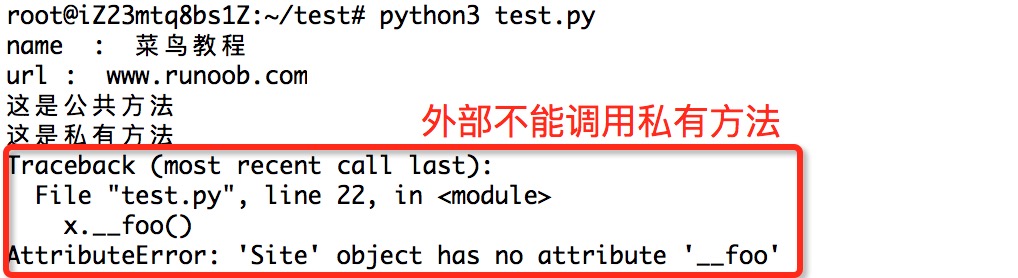
Section titled “Class Private Methods”__private_method: Starting with two underscores, declares the method as private and can only be called within the class, not outside the class. self.__private_methods.
Example
Section titled “Example”An example of class private attributes is as follows:
Example (Python 3.0+)
Section titled “Example (Python 3.0+)”Executing the above program produces the following output:
An example of class private methods is as follows:
Example (Python 3.0+)
Section titled “Example (Python 3.0+)”The execution result of the above example:
Class Special Methods:
Section titled “Class Special Methods:”- __init__ : Constructor, called when an object is created
- __del__ : Destructor, used when releasing an object
- __repr__ : Printing, conversion
- __setitem__ : Assign by index
- __getitem__: Get value by index
- __len__: Get length
- __cmp__: Comparison operation
- __call__: Function call
- __add__: Addition operation
- __sub__: Subtraction operation
- __mul__: Multiplication operation
- __truediv__: Division operation
- __mod__: Modulo operation
- __pow__: Exponentiation
Operator Overloading
Section titled “Operator Overloading”Python also supports operator overloading. We can overload the class’s special methods. The example is as follows:
Example (Python 3.0+)
Section titled “Example (Python 3.0+)”The execution result of the above code is as follows: